Mirror left / right · Flip top / bottom
Image Flip Tool
Switch sides.
Keep the whole picture.
Mirror up to five images left to right, top to bottom or both, with nothing cropped. Fix a mirrored selfie or make a subject face the other way. Text and logos in the picture are reversed too.
Add images to flip
Drag and drop, paste, or choose up to 5 images.
JPG · PNG · WebP · BMP · GIF · SVG · HEIC · 10 MB each
Checking available output formats…
Choose a mirror axis for each image, then flip.
Live mirror preview
Mirror directions
Two axes. Four possible results.
Each mirror button is an on/off switch. The pressed state and the line below the buttons always show what will be saved.
| Control | Effect | Recommended use | What to check |
|---|---|---|---|
| ↔ Mirror left / right | Swaps the left and right sides; top and bottom stay. | Selfies, facing direction | A subject on the left moves to the right, and any text reads backwards. |
| ↕ Flip top / bottom | Swaps the top and bottom; left and right stay. | Reflections, patterns | This is a reflection, not a quarter turn; width and height stay the same. |
| Both mirrors | Reflects across both directions. | Same as 180° | The result matches a 180° turn; text is upside down but not reversed. |
| Press again | Switches that mirror off. | Undo one axis | Pressing left / right twice returns that side to its original direction. |
| Margin and background | Adds equal space around the image, transparent or in a colour. | 0–100 px per side | 20 px on a 1200 × 800 image gives a 1240 × 840 file. |
| Flip all / Download ZIP | Creates every file one by one, then saves the ready ones together. | ZIP for 2+ files | Images that failed or were changed afterwards are left out until flipped again. |
Export choices
The mirror is one step. Saving is another.
JPG photos stay JPG by default and other images default to PNG. Change the format on each image when you need something else.
| Format | Transparency | Quality setting | Consideration |
|---|---|---|---|
| PNG | Kept with a Transparent background | Not used | Lossless pixels, but a mirrored photo can become much larger than its JPG. |
| JPG | White, or your solid colour | 0.10–1.00 | Re-encoded; check fine text and edges for compression artifacts. |
| WebP | Kept with a Transparent background | 0.10–1.00 | Listed only when this browser passes a real WebP encoding test. |
| 24-bit BMP | White, or your solid colour | Not used | Uncompressed; the file can be many times larger. |
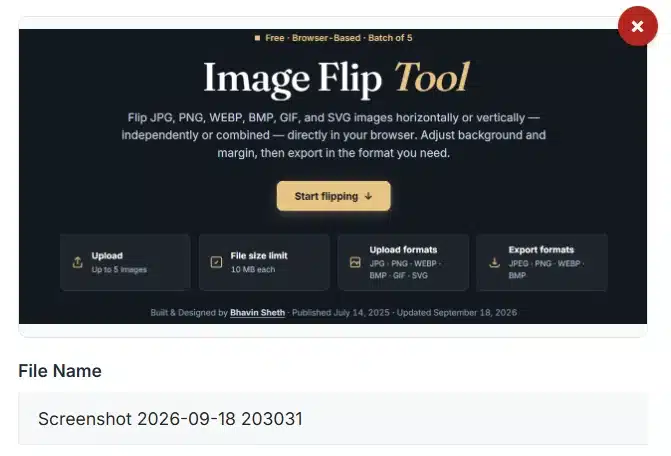
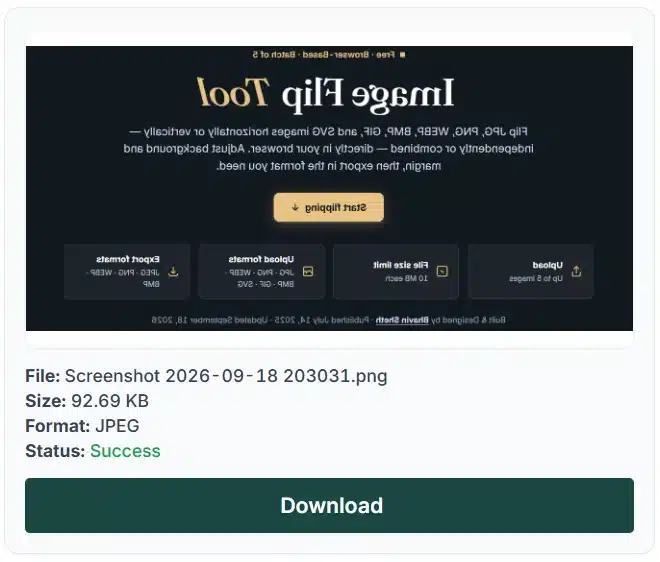
Before & after
The subject stays. Its direction changes.
These images illustrate a mirror. They are not a measured quality or file-size benchmark; inspect your own result before you save it.
Processing boundaries
Full-image reflection. No hidden crop.
A mirror moves every pixel to its reflected position. Nothing is resized, blurred or cut off.
What happens to your images
Details worth checking
A mirror also changes what a picture says
| Use | Recommended settings | What to check |
|---|---|---|
| A front-camera selfie that looks reversed | ↔ Mirror left / right · JPG | The tool does not detect camera settings; compare text on clothing or signs with the real scene. |
| A selfie used as a photo for an Indian online form | ↔ Mirror left / right if text looks reversed · JPG | Then set the pixel size with the Image Resizer and the KB limit with the Image Compressor, following the current notice. |
| Make a subject face the other way in a layout | ↔ Mirror left / right · PNG for graphics | Check logos, clothing, product labels and landmarks for reversed details. |
| Signs, arrows, maps or diagrams | Usually leave unmirrored | Mirroring can change their meaning; text and arrow directions are reversed. |
| A sideways photo that needs to stand upright | Use the Image Rotation Tool | A mirror never turns an image by 90°; that is a rotation. |
Batch behaviour
Batch buttons switch each image's own state
All ↔ from a fresh batch
Every image switches to a left / right mirror. Its top / bottom state, margin and format stay as they were.
A mixed batch stays mixed
If one image is already mirrored and another is not, All ↔ switches both, so their states swap rather than becoming the same.
Start from the same state
Reset all turns every mirror off without changing margins, names, backgrounds or formats. Then apply one batch mirror.
One ZIP for ready files
Download ZIP keeps each file's own name and format. Duplicate names get a number, and the ZIP does not compress the images again.
Troubleshooting
Read the mirror state. Then inspect the file.
A second press undid the mirror
The mirror buttons are on/off switches.
- A pressed (highlighted) button means that mirror is on.
- Read the line under the buttons for the current state.
- Use Reset this image to start again.
Text reads backwards
Mirroring reverses everything in the picture, including text.
- Turn the left / right mirror off if labels must stay readable.
- For an upside-down photo, use the Image Rotation Tool instead.
- The tool does not detect or repair reversed lettering.
The margin looks white
JPG and BMP cannot store transparency.
- Choose PNG, or WebP when the format list shows it.
- Keep the background set to Transparent.
- Or choose a solid colour that matches your page.
The ZIP has fewer files
Only images that are ready are included.
- Check each image's status in the list.
- Changing a setting clears that image's file; flip it again.
- Failed images are reported in the message above the list.
Mirror questions
Image flipping explained
What is a horizontal image flip?
A horizontal flip mirrors the whole image from left to right: the left edge becomes the right edge, while top and bottom stay in place. Faces, lettering and arrows all mirror together; the tool does not correct text separately.
What is a vertical image flip?
A vertical flip swaps the top and bottom of the whole image while left and right stay in place. It is a reflection, not a 90-degree turn. Use the Image Rotation Tool for quarter turns or a custom angle.
What happens when both mirrors are on?
The two mirrors work independently. With both on, the result looks the same as a 180-degree turn, and the width and height stay the same. Pressing the same mirror again switches it off. Reset this image turns both off and restores the other settings.
How do the batch mirror buttons handle mixed states?
All ↔ switches the left / right mirror of every image, and All ↕ does the same for top / bottom. Each image switches from its own current state, so a mixed batch stays mixed. Reset all turns every mirror off while keeping margins, backgrounds, formats and names.
Can I download all flipped images together?
Yes. Download ZIP saves every ready image in one ZIP with its own name and format. If only some are ready, the button shows how many and leaves the rest out. Duplicate names get a number, and each ready image can still be downloaded on its own.
Does flipping change the size or remove content?
No. A flip keeps the image's width and height and mirrors all of it, without cropping, stretching or straightening. Margin adds 0–100 pixels on each side: a 1200 × 800 image with a 20 px margin becomes 1240 × 840.
Will a mirrored photo keep the same quality?
Each mirror is drawn from the original decoded pixels, so pixels are moved, not blurred. PNG saves them without loss; JPG and WebP re-encode the image and can show artifacts. Metadata and colour profiles are not kept, and the file is not byte-for-byte identical.
Which image formats and limits are supported?
Add up to five non-empty JPG/JPEG, PNG, WebP, BMP, GIF, HEIC/HEIF or self-contained SVG files, each no larger than 10 MB. Each image and result must stay within 20 MP and 16,384 px per side, all images together within 40 MP, and each saved file within 96 MB. SVG needs a pixel width and height.
Which output formats keep transparency?
PNG and WebP keep transparent pixels when the background is Transparent. Solid colour fills transparent areas and the margin with your colour. JPG and 24-bit BMP cannot store transparency, so Transparent becomes white for them. WebP is listed only when this browser passes an encoding test.
Why does the quality setting leave the preview unchanged?
The preview shows the mirrored pixels before saving, fitted within 900 pixels. Quality affects only JPG and WebP files when you press Flip; PNG and BMP ignore it. Inspect the result to judge artifacts and file size.
Why did a flipped file or the ZIP disappear after an edit?
Changing a mirror, the margin, background, format or quality clears that image's earlier file so an outdated result is not saved. Press Flip again. Renaming keeps the image but rebuilds the ZIP; appearance and the expanded view change nothing.
Do my photos leave my device when I flip them?
No. Images are decoded, mirrored and zipped in your browser and are not sent to our server. Only when a HEIC photo cannot be opened by the browser is a decoder fetched from jsDelivr, and your photo is not part of that request. Clear all removes the images from this page.
Can I stop flipping, and are animation and vectors kept?
Stop cancels the image being processed and skips the rest; finished files stay available. A GIF gives its first frame and SVG becomes pixels, so animation, editable vectors and metadata are not kept. Your original files never change.
Continue editing
Another task for your image
Ready to mirror your image?
Go back to your mirror settings, or explore all image tools.